Victorian House Coloring Pages for KDP
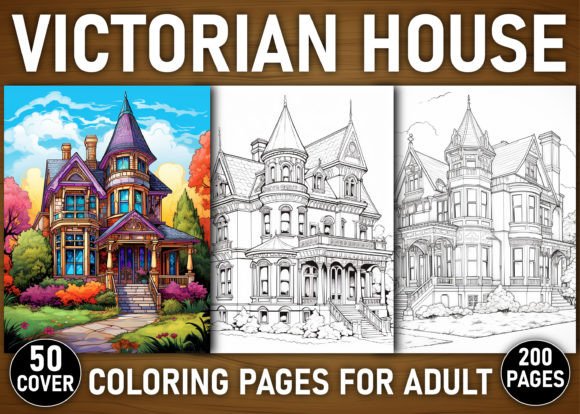
Victorian House Coloring Pages for KDP is a production-ready digital asset pack designed to accelerate the creation of high-quality adult coloring books for Amazon Kindle Direct Publishing. It’s not just a collection of images—it’s a workflow component: a pre-vetted, print-optimized, and commercially licensed resource that fits directly into your book development pipeline. Whether you’re launching your first KDP title or scaling a catalog of themed coloring books, this set reduces friction in three critical areas: design consistency, production speed, and format readiness.
The core offering—200 Victorian house illustrations—was curated with architectural accuracy and stylistic variety in mind. Each page reflects authentic period features: bay windows, turrets, ornate gables, spindlework porches, patterned shingles, stained-glass transoms, and textured brickwork. These aren’t generic “old houses.” They’re research-informed interpretations that resonate with adult colorists seeking both aesthetic satisfaction and historical resonance. That specificity matters—not only for audience engagement but for discoverability. Readers searching for “Victorian architecture coloring,” “historical home coloring pages,” or “detailed house line art” land here because the content matches intent precisely.
How It Fits Into Your KDP Workflow
Think of Victorian House Coloring Pages for KDP as a modular building block—not a standalone product, but an enabler. It integrates at multiple points across your publishing cycle:
- Before launch: Use the 50 premium cover images to A/B test thumbnails on Amazon or social media. Since all covers are delivered as transparent-background PNGs, they drop cleanly into Canva, Adobe Express, or KDP’s cover creator without clipping or quality loss.
- During assembly: The dual-format delivery (PDF + JPG) means you can import pages directly into layout tools like Affinity Publisher or Adobe InDesign—or use the PDF as a master template and add custom intros, instructions, or branding pages around it.
- After publication: Reuse individual PNGs for promotional assets—Instagram carousels, Pinterest pins, or email newsletter headers—without re-exporting or upscaling. The high-resolution source files (300 DPI, A4 size with bleed) ensure pixel-perfect output across print and digital channels.
This isn’t theoretical efficiency. One freelance illustrator reported cutting her average book assembly time from 18 hours to under 4.5 by using this set as a base layer, then adding only minimal custom typography and section dividers. Another small publisher batch-launched three themed coloring books in six weeks—Victorian Houses, Art Deco Interiors, and Tudor Cottages—by standardizing file naming, bleed settings, and interior layout across all three using the same structural foundation.
Compatibility and Practical Integration
The formats included—PNG, JPG, and PDF—are chosen for interoperability, not redundancy. Here’s how each serves a distinct role:
- PNG files retain transparency, making them ideal for layered editing (e.g., adding watercolor textures in Procreate or blending overlays in Photoshop). You can isolate windows, roofs, or decorative borders and recolor them independently before merging back into the full page.
- JPG files load faster in most layout software and are universally accepted by KDP’s upload system. Use these when finalizing interiors for print—especially if you’re working on lower-spec hardware or collaborating with non-designers who need lightweight, stable assets.
- The master PDF is pre-formatted with correct margins, bleed (0.125″), and crop marks. It’s ready to upload as-is or serve as a reference for verifying alignment and spacing when building custom versions.
Importantly, all files follow consistent naming conventions—VH-001-TurretFront.png, VH-147-StainedGlass.png, etc.—which supports bulk processing in tools like XnConvert or Adobe Bridge. If you use metadata tagging or folder-based organization (e.g., grouping by complexity level or facade orientation), the structure holds up without manual renaming.
Quality Control and Long-Term Usability
Each illustration underwent two rounds of quality review: first for line integrity (no stray pixels, broken paths, or unintended gaps), and second for print fidelity (testing grayscale contrast at 300 DPI on uncoated paper stock). That attention ensures your final book avoids common KDP rejection triggers—like faint lines that disappear during printing or overlapping strokes that create muddy shadows.
For long-term use, consider how the set scales with your goals. The interiors are fully editable—meaning you can resize porches, adjust roof pitches, or simplify window mullions to match your target audience’s skill level. One educator repurposed 30 of the pages into classroom handouts on architectural history, adding numbered callouts and short captions in Google Slides before exporting as PDFs for student use. Another creator used the same files to generate animated timelapse coloring videos for YouTube, leveraging the clean vector-like linework for smooth stroke reveals.
That flexibility extends to licensing. The commercial license permits unlimited physical and digital distribution—including resale of finished books, use in online courses, or inclusion in subscription bundles—as long as the raw source files aren’t redistributed. No attribution is required, which streamlines branding and maintains professional polish across touchpoints.
Implementation Tips for Real Workflows
Start small. Pick five pages that represent a range of difficulty—say, a simple side elevation (VH-023), a complex corner turret (VH-119), a detailed porch with spindlework (VH-067), a symmetrical front facade (VH-088), and an asymmetrical composition with varied rooflines (VH-182). Use those to test your entire pipeline: import → adjust contrast if needed → add page numbers → export → soft-proof on KDP’s previewer → order a physical proof copy.
Organize your working folder like this:
- Source/ — untouched PNGs and JPGs
- Edited/ — adjusted contrast, resized elements, added text
- Export/ — final PDFs, cover variants, thumbnail crops
- Archive/ — dated backups and KDP submission logs
This keeps iterations traceable and prevents accidental overwrites. Also, maintain a simple spreadsheet logging which pages you’ve used, where, and any notes—e.g., “VH-141 used in Book #3, p. 42; lightened background 10% for better pencil visibility.” That log becomes invaluable when expanding into sequels or companion titles.
Finally, treat the 50 cover images not as decoration—but as strategic assets. Test variations: some with serif fonts evoking Victorian typography, others with bold sans-serif for modern contrast. Upload three options to KDP and monitor early sales data. You’ll quickly learn whether “ornate frame + vintage palette” converts better than “minimal border + high-contrast title”—information that informs your next title’s visual strategy before you open a single design file.
Victorian House Coloring Pages for KDP doesn’t replace creative judgment—it sharpens it. By removing technical bottlenecks and standardizing foundational elements, it returns time and attention to what matters most: curating experiences that resonate, delivering products that perform, and building a sustainable creative practice—one well-drawn gable, one thoughtful decision, one published book at a time.