150 Cute Dinosaur Coloring Pages - KDP
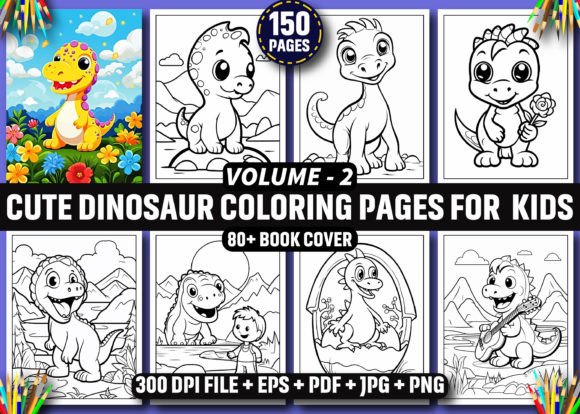
If you're building a children’s coloring book for Amazon KDP—or planning to launch multiple themed editions—the 150 Cute Dinosaur Coloring Pages - KDP bundle is a smart starting point. It delivers 150 original, high-resolution black-and-white illustrations designed specifically for print: A4 and 8.5×11″ compatible, 300 DPI, and supplied in four formats—EPS (editable), PDF (print-ready), JPG, and PNG. That flexibility means you’re not locked into one workflow. Whether you're a hobbyist testing your first KDP title or a seasoned creator scaling a series like Cute Dinosaur Coloring Book For Kids Volume 2, this set gives you real production leverage.
What People Often Misunderstand About These Pages
First: these are AI-generated—but not in the low-effort, blurry, or inconsistent way many assume. The output has been refined for clean linework, balanced negative space, and age-appropriate simplicity (think friendly T. rexes with big eyes, not hyper-realistic predators). Still, “AI-generated” doesn’t mean “plug-and-play perfect.” Some lines may need light cleanup in Illustrator—especially where overlapping limbs or fine details meet. That’s normal. What’s not normal is expecting zero prep before printing. Skipping that step leads to faint lines, broken outlines, or uneven contrast on physical copies—issues readers notice fast.
Second, many assume “300 DPI” guarantees print success. It does—for resolution—but not for layout integrity. If you drop a PNG directly into an InDesign file without checking bleed, margins, or image anchoring, you risk cut-off edges or misaligned pages. Likewise, resizing a PNG beyond its native dimensions—even at 300 DPI—can soften edges. EPS files avoid this entirely, since they’re vector-based and infinitely scalable. Yet many creators default to JPG or PNG simply because they’re more familiar—not because they’re optimal.
Common Pitfalls—and How to Avoid Them
1. Using only PNG/JPG for interior layout
It’s tempting to drag and drop 150 PNGs into a document and call it done. But PNGs embed transparent backgrounds—which can clash with printer settings or cause unexpected white gaps. Worse, if your KDP trim size shifts slightly during upload, raster images won’t adapt. Solution: Use the EPS files for layout. Import them into Illustrator or InDesign as vectors, then export final spreads as PDF/X-4. You retain crispness at any scale and full control over line weight and spacing.
2. Assuming all 150 pages work equally well for kids aged 3–8
Not every cute dinosaur design suits every age group. A page with tiny pterodactyl eggs scattered across intricate ferns may frustrate a 4-year-old but delight a 7-year-old. Review each illustration for clarity of main subject, spacing between elements, and contour confidence (i.e., no ambiguous outlines). Flag 10–15 especially simple ones for your “First Dino Book” edition—and save denser scenes for Volume 2 or an “Advanced Dino Fun” spinoff.
3. Overlooking format-specific strengths
The .zip includes 80 cover-ready PNGs—but those aren’t meant for interiors. They’re optimized for thumbnail visibility and cover mockups. Don’t repurpose them as interior pages. Likewise, the PDF is print-ready *as-is*, but it’s a single flat file—not individual pages you can reorder or annotate. If you plan custom sequencing (e.g., grouping by dino type or difficulty), work from the EPS or JPG folders instead.
What to Check Before You Build Your First Book
Before importing anything into your KDP interior template, run through this quick checklist:
- Line consistency: Zoom in on 5–10 random EPS files. Do strokes hold steady at 0.5–1 pt? Are there stray anchor points or duplicate paths? Clean those in Illustrator using Object > Path > Simplify or manual node editing.
- Page count alignment: KDP prefers interiors divisible by 2 (for duplex printing) and ideally by 4 (to avoid blank pages). 150 pages fits cleanly—but only if you include title, copyright, and bonus pages intentionally. Plan those early so your final count stays professional (e.g., 154 or 160 pages, not 153).
- Font and text compatibility: None of the 150 pages include text—but if you add activity prompts (“Draw a friend for this stegosaurus!”), use KDP-safe fonts (like Calibri, Arial, or Noto Sans) and embed them in your PDF export. Avoid script fonts smaller than 14 pt for young readers.
- Color mode: All files are grayscale—but double-check your final PDF isn’t accidentally set to RGB. KDP requires CMYK or grayscale PDFs for best B&W results. In Acrobat Pro, use Tools > Print Production > Convert Colors to verify.
Why This Bundle Supports Real Business Decisions
This isn’t just clipart—it’s a production toolkit. With editable EPS files, you can recolor line art for themed variants (pastel dinos, neon night scenes, watercolor-style outlines), resize confidently for board books or poster packs, or even extract elements to build matching stickers or flashcards. Educators can pull single pages for classroom handouts; small business owners can license select designs for party printables. The 80 cover PNGs give you room to test thumbnails, A/B test titles on social media, or generate mockups for your KDP store page—all without hiring a designer.
And because the files are delivered as a single .zip—not scattered across email or cloud links—you maintain version control. No hunting for “the good triceratops file” across three folders. Everything is named logically (e.g., dino_cute_042.eps), making batch processing in Illustrator or bulk renaming in Bridge efficient.
A Final Note on Realistic Expectations
Yes, these are AI-assisted. Yes, minor imperfections exist—like a slightly wobbly tail curve or inconsistent horn thickness. But those aren’t flaws you can’t fix. They’re opportunities to add your own polish, voice, and brand consistency. One creator used the base EPS files to add subtle texture brushes in Illustrator, turning flat outlines into “chalk-drawn” dinos. Another grouped pages by habitat (jungle, desert, ice cave) and added gentle background gradients—without altering the core line art. That’s the real value: 150 Cute Dinosaur Coloring Pages - KDP isn’t the finished product. It’s your reliable, high-quality raw material—ready for your expertise to bring it to life.